A second desk for your front counter
The routine emails your team answers twenty times a day, drafted from your own inventory, prices and orders. Your people check each one and press send. It's there to take the monotonous part of the job, not anyone's job, so your team has more time for the work that matters most. Customized for each business, set up in four weeks.
See it work
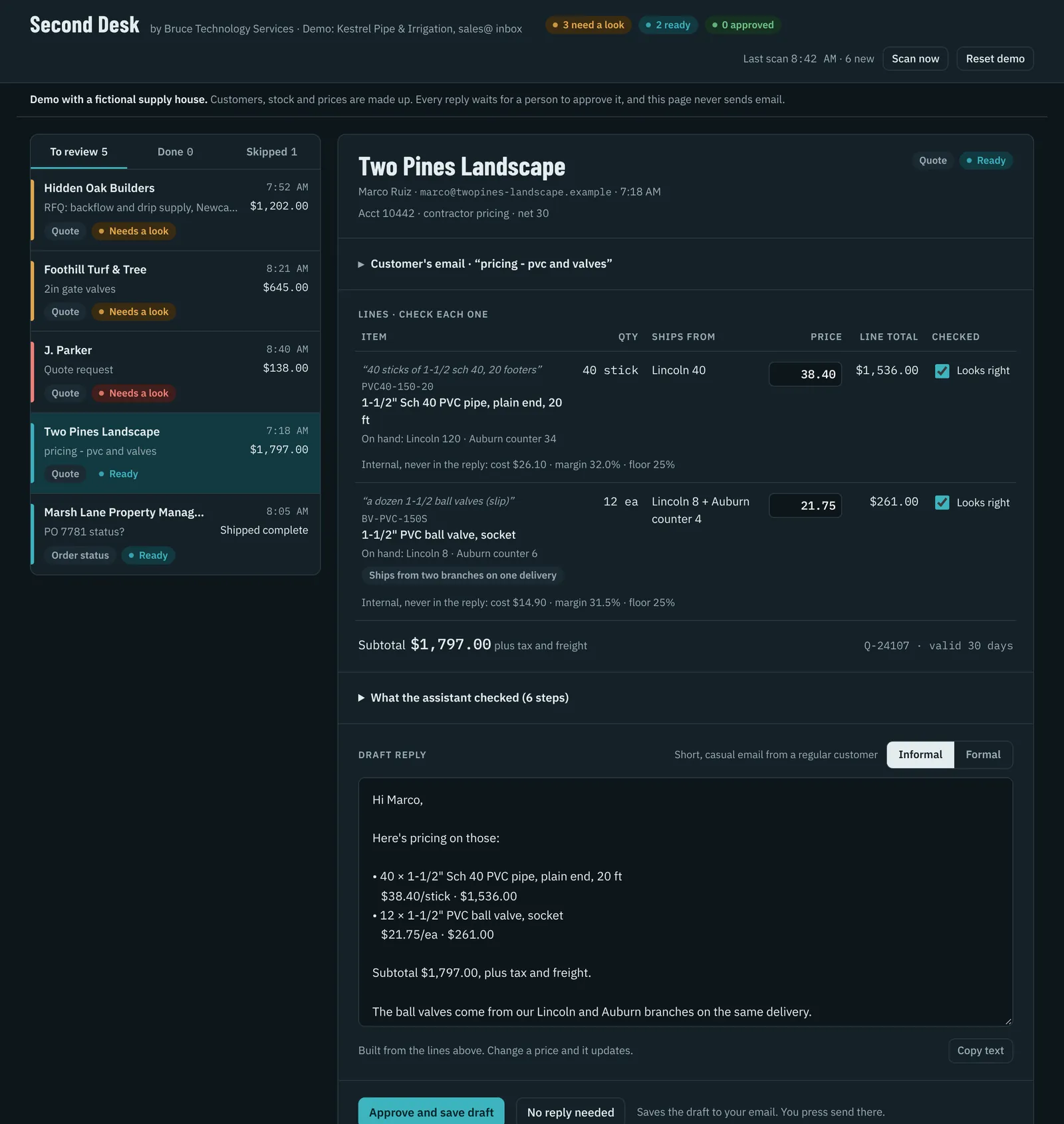
This is the page your team works from
The morning's emails arrive sorted, with the numbers looked up and the reply written. Your team ticks each line, fixes anything that's off, and approves. Anything unusual sits at the top of the list.
Change a price, switch the tone, approve a draft. Nothing is sent.
How it works
Three steps run on their own. The last one is always a person.
- 1
Reads the inbox
A scheduled scan of your shared inbox runs during business hours. Each email is sorted as a quote request, an order-status question, or something a person should handle.
- Works with Gmail or Microsoft 365
- Newsletters, POs and anything unusual are left alone
- 2
Looks it up in your system
Stock by location, your price list, open orders and lead times come straight from the software you already use. The connection is read-only, so it can look but never change anything.
- Inventory and ERP systems, spreadsheets, job files
- Margin floors and customer price levels respected
- 3
Drafts the reply
Every price, quantity and date in the draft comes from the lookup. It matches the customer, casual for a regular, formal for a first contact, and flags anything that needs a closer look.
- New customers, assumed quantities, backorders
- Emails that try to give the assistant instructions
- 4
Your team approves You
On one shared review page, your team ticks each line, edits if needed and approves. The approved draft lands in their own email, and they press send.
What it handles
The emails you answer twenty times a day
Quotes, order status and lead times
Price and availability requests answered from live stock across your branches, with split shipments and backorders spelled out using real due dates.
- Price and availability quotes
- Where's my order
- Lead times and backorders
Need 10 of the 2" brass gate valves, threaded. You got them?
Bid invites, RFIs and change orders
Bid invitations logged and sorted by due date, RFIs and submittals tracked against the job, and change-order emails drafted from the job file.
- Bid invitations
- RFIs and submittals
- Change-order replies
Please confirm receipt of the bid set for the Lincoln medical office and your intent to bid by Friday.
Appointments and estimates
Appointment and estimate requests answered with your real openings and price list, plus follow-ups for jobs that went quiet.
- Scheduling requests
- Estimates from your price list
- Follow-ups
Our AC is blowing warm. Can someone come out this week, and what's the service call fee?
Work orders and tenant updates
Maintenance requests logged and acknowledged, vendors scheduled, and tenants kept up to date without retyping the same answer.
- Maintenance requests
- Tenant status updates
- Vendor scheduling
The kitchen sink in unit 14 is leaking under the cabinet again.
Safeguards
Built so a wrong email can't leave the building
The same rules run in every setup, and they're written into the contract.
- Nothing sends itselfThe assistant can draft and label. Only a person can send.
- Read-only accessIt can look up your inventory, prices and orders. It can't change them.
- No made-up numbersEvery price, quantity and date comes from your system. If it can't find something, the draft says you'll confirm.
- Flags the odd onesNew customers, assumed quantities, backorders, prices below your margin floor, and emails that try to give the assistant instructions.
- You own itThe Claude account, the bill, the data and the rules are yours. If we part ways, everything stays with you.
Hours-saved estimate
What would it give back to your team?
Move the sliders to match your shop. It's a rough estimate; the paid assessment measures the real numbers before you commit to a build.
Hours × 5 days × share drafted. An example, not a promise.
Pricing
Fixed prices. You know the number before we start.
Founding-client prices for the first three businesses. You pay Anthropic directly for Claude, the AI that runs the desk.
Questions
What owners ask first
Will this replace someone on my team?
No. It's designed to save time on repetitive lookups and replies, not to cut staff. Your team still checks and sends every email, and the hours it saves go to the work that needs a person: tricky quotes, problem orders, new customers and the phone.
Do I need new software?
No. It works with the email you already use (Gmail or Microsoft 365) and connects read-only to the system you already keep stock, prices or jobs in. Your team gets one shared review page.
What if a draft is wrong?
Then a person catches it before it goes anywhere. That's the point of the review step. Drafts that need extra care are flagged at the top of the list.
Is our data safe?
It runs in your own Claude business account, and Anthropic doesn't train its models on business-plan chats by default. My access is read-only and limited to what the workflow needs, and I keep no copies of your data.
Our system is old. Will it work?
Usually. If it can export a spreadsheet, has a database, or offers any kind of web connection, there's a way to read from it. The assessment tells you for sure before you pay for a build.
Can't we just use ChatGPT ourselves?
You can, for writing. What you're paying for here is the connection to your own inventory and orders, your house rules, and the approval desk, set up and kept running.